You bought a router with four ports. Then came the smart TV, the gaming console, the work laptop dock, and the printer. Now you're standing there holding a cable with nowhere to put it — and the Wi-Fi just isn't fast enough for what you're doing.
Here's the good news: you don't need a new router. You need a small, cheap box called a network switch.
What a Network Switch Actually Does
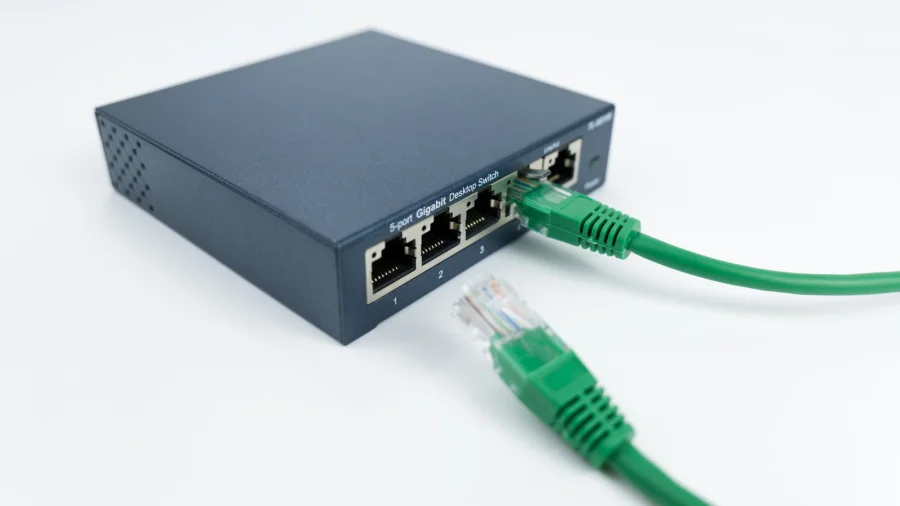
A network switch is a simple device that takes one Ethernet cable from your router and turns it into several available ports. Plug the switch into your router, and every device you connect to the switch behaves as if it were plugged directly into the router itself.
That's the whole trick. One cable in, many ports out.
Why Your Router Runs Out So Fast
Most consumer routers ship with two to four LAN ports. That was fine a decade ago, when a household had one desktop and maybe a printer. Today, a single room can have a console, a TV, a streaming stick, a work dock, and a NAS drive — all competing for the same handful of sockets.
Wi-Fi can absorb some of that load, but wired connections remain faster, more stable, and lower latency. For gaming, video calls, and large file transfers, Ethernet still wins.
Which Switch Should You Buy
For a home setup, you want an unmanaged switch. These are plug-and-play: no app, no login, no configuration screen. You plug in power, connect one cable to the router, and you're done.
Look for a 5-port or 8-port model. A 5-port switch gives you four usable ports after the uplink to the router. An 8-port gives you seven. Buy one size larger than you think you need — devices multiply.
Gigabit speed is the baseline you should insist on. Anything advertised as "fast Ethernet" is capped at 100 Mbps and will bottleneck modern internet plans.
How to Set It Up in Under Five Minutes
Place the switch near your router. Connect the switch's power adapter. Run one Ethernet cable from any LAN port on your router to any port on the switch. Then plug your devices into the remaining ports.
That's it. There is no software step. The switch doesn't have an IP address you need to manage, and it won't interfere with your router's settings.
Switch vs. Splitter vs. New Router
An "Ethernet splitter" is a different product and usually the wrong one. Cheap passive splitters divide a single connection and cannot handle multiple devices talking at once. A switch handles traffic properly.
Buying a new router with more ports is an option, but it's expensive and unnecessary if your current router's Wi-Fi is working fine. A switch solves the port problem for a fraction of the cost.
Where It Can Go Wrong
Switches are reliable, but a few things trip people up. Daisy-chaining too many switches can create messy cabling and confusing troubleshooting. Cheap power adapters fail more often than the switch itself. And if you accidentally create a loop — plugging two cables between the same two devices — some switches will stall until you remove one.
None of these are dealbreakers. They're just reasons to keep your setup simple.
Who This Actually Helps
Remote workers who need a stable wired connection for calls. Gamers chasing lower ping. Households where the router sits in one corner and every device wants a cable. Anyone who has ever unplugged the printer to plug in a laptop.
If that sounds familiar, a switch is one of the cheapest upgrades you can make to your home network.
Frequently Asked Questions
Does a network switch slow down my internet?
No. A gigabit switch passes traffic at full speed. If anything, moving devices off Wi-Fi and onto wired connections improves overall network performance.
Can I connect a switch to another switch?
Yes, but keep it to one extra layer. Chaining multiple switches adds clutter and makes problems harder to trace.
Do I need a managed switch for home use?
No. Managed switches are for offices that need VLANs and traffic control. For a home, an unmanaged switch is simpler and cheaper.
Will a switch work with any router?
Yes. Any standard router with a free LAN port will work with any standard Ethernet switch.
Our Take
This isn't a glamorous upgrade, and nobody writes about network switches unless something has gone wrong. But that's exactly the point — the fix for a full router is boring, cheap, and takes minutes. Most people overthink it and start shopping for a new router they don't need.
Buy a gigabit switch. Plug it in. Get back to work.