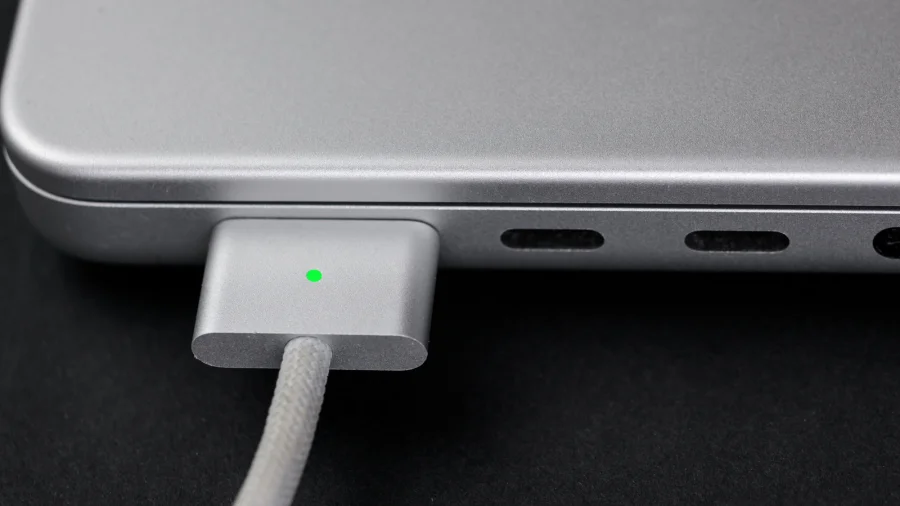
You unplug your MacBook in a hurry, the cable snags, and the laptop lurches off the table. That single moment is the entire argument for MagSafe — and also the reason USB-C still refuses to go away.
Both ports charge the same machine. But they behave very differently in real life, and the choice you make says a lot about how you use your laptop.
Two Ports, One Laptop — What Apple Actually Gives You
On current 14-inch and 16-inch MacBook Pro models, Apple includes a MagSafe 3 port on the left side, plus Thunderbolt/USB-C ports that can also accept power. The MacBook Air (M2 and later) follows the same pattern.
That means you are not locked into one method. Apple supports charging through either route, and the laptop does not care which one you pick — it just wants enough wattage.
Why MagSafe Feels Safer in Daily Use
MagSafe connects magnetically. Pull the cable at an angle and it detaches instead of dragging your laptop to the floor. For anyone who works from cafés, trains, or shared desks, that is not a small feature.
It also keeps your USB-C ports free. On a machine with limited ports, losing one to a charger every day adds up.
Where USB-C Quietly Wins
USB-C charging means one cable for your laptop, phone, tablet, and monitor. Travel light and you can leave the MagSafe cable at home entirely.
It also helps in a pinch — a friend's charger, a power bank, or a monitor with power delivery can all top up your MacBook without the dedicated Apple cable.
Speed, Wattage, and the Myth of "Faster"
Charging speed depends on the adapter's wattage, not the port type. A 140W adapter charges a 16-inch MacBook Pro faster than a 67W adapter, regardless of whether it is plugged into MagSafe or USB-C.
Match the charger to your model. Using an underpowered adapter will still charge the laptop, but slowly — and sometimes only when the lid is closed.
What Remains Unclear or Model-Dependent
Not every MacBook has MagSafe. Older Intel models and some entry configurations rely entirely on USB-C. If you are unsure, check your specific model's port layout before buying a cable.
Apple has not signalled plans to drop either method, but the company's port decisions have shifted before — so treat this as the current state, not a permanent guarantee.
Risks and Trade-Offs Worth Knowing
MagSafe cables are proprietary and cost more to replace. Lose one on a trip and you may struggle to find a spare quickly.
USB-C cables vary wildly in quality. A cheap cable may not carry enough wattage, and some will charge slowly or not at all. Certification matters here.
The Bigger Pattern: Apple's Port Philosophy
Apple spent years removing ports, then brought MagSafe back. The lesson is that convenience and safety rarely live in the same connector — and Apple now lets users pick which one they value more.
Practical Guidance for Buyers and Owners
If you mostly work at a desk, MagSafe is the cleaner daily driver. If you travel constantly or want one cable for everything, USB-C is the smarter default.
Many users do both: MagSafe at home, USB-C on the road. That is not indecision — it is the setup Apple quietly designed for.
Future Outlook
Expect both ports to coexist for now. As USB-C power delivery improves and GaN chargers get smaller, the gap between the two methods will keep narrowing — but MagSafe's magnetic safety will remain hard to replicate.
Our Take
This is not really a winner-takes-all debate. MagSafe wins on safety and port economy; USB-C wins on flexibility and universality. The right answer is the one that matches your desk, your bag, and your habits.
Frequently Asked Questions
Can I charge my MacBook with USB-C instead of MagSafe?
Yes. On supported models, Apple allows charging through either the MagSafe 3 port or a USB-C/Thunderbolt port, provided the adapter delivers enough wattage.
Is MagSafe faster than USB-C for charging?
No. Charging speed depends on the adapter's wattage, not the port. A higher-wattage adapter will charge faster through either method.
Do all MacBooks have MagSafe?
No. MagSafe 3 is available on newer MacBook Air (M2 and later) and MacBook Pro (14-inch and 16-inch) models. Older MacBooks rely on USB-C only.
Which cable should I carry while travelling?
A certified USB-C cable is usually the more practical travel choice, since it can charge multiple devices. Many users still keep a MagSafe cable for desk use.