You plug in your iPhone, the CarPlay screen lights up, and there it is again — Apple Maps. If you're one of the many drivers who prefer Google Maps, this small moment of friction happens every single time you get in the car. And in most regions, there's no setting that fixes it.
Why CarPlay Won't Let You Set Google Maps as Default
In most regions, CarPlay does not allow third-party navigation apps like Google Maps to be set as the system default. That means when you tap a navigation shortcut or ask Siri for directions, Apple Maps opens instead.
This isn't a bug. It's how Apple has designed the CarPlay experience in most markets. The source material confirms this limitation remains in place, and neither Apple nor Google has announced a change.
What You Can Actually Control
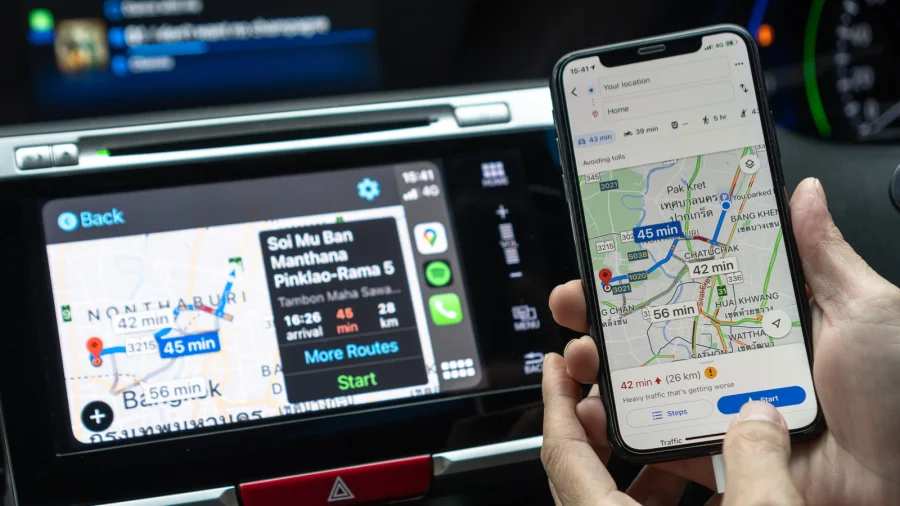
You can't change the default — but you can change how quickly you get to Google Maps. The app itself works on CarPlay; it just isn't the one that opens automatically.
That distinction matters. Most of the frustration drivers feel isn't about Google Maps being unavailable. It's about the extra taps, the wrong app opening, and the distraction that comes with fixing it at 60 km/h.
Make Google Maps the First Thing You See
One of the simplest improvements is arranging your CarPlay home screen so Google Maps sits on the first page, ideally in the first row. Fewer swipes means less time looking at the screen instead of the road.
You can reorder CarPlay app icons from your iPhone's Settings under the CarPlay section. Put Google Maps where your thumb naturally lands.
Use Siri Carefully — and Know Its Limits
Voice control is the safest way to interact with CarPlay, but Siri defaults to Apple Maps for navigation requests. Saying "Hey Siri, directions to..." will not open Google Maps.
Instead, open Google Maps first, then use its own voice search or recent destinations. It's one extra step, but it keeps your hands off the screen once you're moving.
Set Up Destinations Before You Drive
The most effective habit isn't a setting at all. Start your route in Google Maps before you shift into gear. Recent destinations, saved places, and home and work shortcuts are all waiting inside the app.
Doing this while parked eliminates almost all in-car interaction with the phone — which is both safer and faster.
Confirmed Facts vs What Remains Unclear
Confirmed: Google Maps cannot be set as the CarPlay default in most regions, according to the source material. The app is available on CarPlay and can be opened manually.
Unclear: Whether Apple plans to allow third-party default navigation apps in more regions, or whether Google is pushing for that change. No official statements from either company were provided.
Risks and the Balanced View
There's a fair argument on Apple's side: a single default navigation app keeps the CarPlay experience consistent and predictable, and Apple Maps has improved significantly in recent years.
But for drivers who rely on Google Maps for its traffic data, local business listings, or familiarity, the limitation is a real daily annoyance. Neither position is unreasonable — it's a design choice with trade-offs.
The Bigger Pattern: Walled Gardens in the Car
This isn't just a CarPlay story. It reflects a broader tension between Apple's closed ecosystem and Google's cross-platform services. Similar friction exists on Android Auto in reverse, and in smart home, wearables, and messaging.
For users, the practical reality is simple: pick your ecosystem, then learn its shortcuts. Fighting the defaults rarely works.
What Drivers Should Do Now
Reorder your CarPlay home screen so Google Maps is front and center. Set your destination before you start driving. Use Google Maps' own voice search instead of Siri for navigation. And accept that the default won't change — at least not yet.
These aren't dramatic fixes. But together, they turn a daily irritation into something you barely notice.
Future Outlook
Apple has gradually opened CarPlay to more third-party app categories over the years. It's possible default navigation options expand in future iOS updates, but no such change has been announced.
Until then, the workaround is the workflow.
Our Take
This is a small story about a small annoyance — but it says something larger about how much control platform owners still have over everyday experiences. Google Maps is one of the most-used apps in the world, yet on CarPlay it plays second fiddle by design.
For now, the smart move isn't to wait for Apple to change. It's to set up your car so the friction disappears.
Frequently Asked Questions
Can I set Google Maps as the default in CarPlay?
No. In most regions, CarPlay does not allow third-party apps like Google Maps to be set as the default navigation app. Apple Maps remains the system default.
Does Google Maps work on CarPlay at all?
Yes. Google Maps is available on CarPlay and works fully — it just doesn't open automatically when you request directions.
How do I make Google Maps easier to open on CarPlay?
Reorder your CarPlay home screen from your iPhone's Settings so Google Maps appears on the first page. Set your destination before driving, and use Google Maps' own voice search instead of Siri.
Will Apple ever allow Google Maps as the CarPlay default?
No official change has been announced. Apple has expanded third-party support in CarPlay over time, but default navigation remains restricted in most regions.