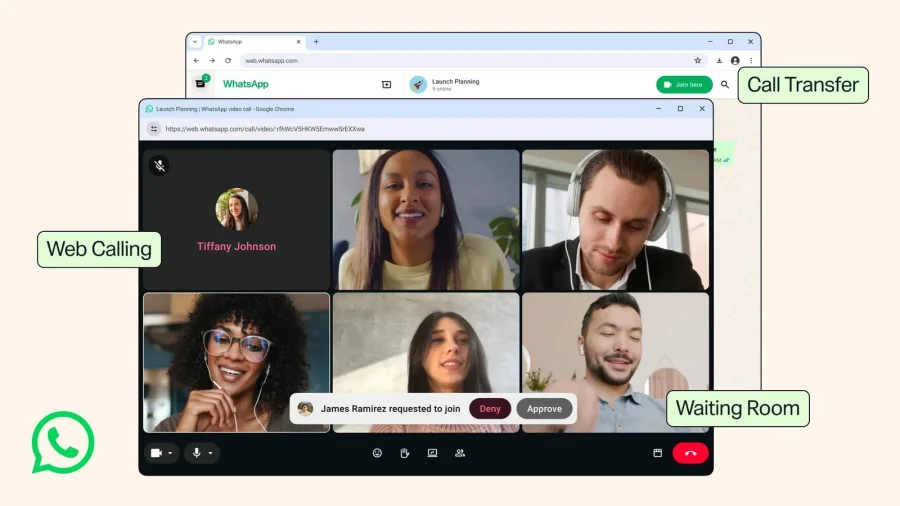
For millions who rely on WhatsApp for daily communication, a long-requested feature has finally arrived. The messaging platform now supports end-to-end encrypted voice and video calls on its web and desktop versions, bringing the same privacy standard that mobile users have enjoyed for years to the browser and computer.
How WhatsApp Web Calls Work Now
Previously, WhatsApp Web and desktop apps only allowed text messaging, file sharing, and media previews. Voice and video calls were restricted to mobile devices. With this update, users can initiate and receive encrypted calls directly from their computer, provided their phone remains connected to the internet and logged into WhatsApp.
Why This Matters for Privacy
End-to-end encryption means that only the participants in a call can hear or see each other. Not even WhatsApp or Meta can access the content. For journalists, activists, remote workers, or anyone handling sensitive conversations, this eliminates a major privacy gap. Earlier, switching to a desktop call often meant using unencrypted third-party apps or compromising security.
The Technical Backbone: Signal Protocol
WhatsApp uses the Signal Protocol, developed by Open Whisper Systems, to encrypt all calls and messages. The same protocol powers Signal and is widely regarded as the gold standard for secure communication. The web call feature integrates this protocol seamlessly, ensuring no degradation in security compared to mobile calls.
Who Benefits Most from This Update
Remote workers who spend hours on video calls can now use WhatsApp from their laptop without picking up their phone. Users with poor mobile connectivity can switch to a stable desktop internet connection while maintaining encryption. Privacy-conscious individuals who avoid desktop apps due to security concerns now have a trusted option.
How to Start Using WhatsApp Web Calls
To access the feature, ensure your WhatsApp app on the phone is updated to the latest version. Open web.whatsapp.com or the desktop app, scan the QR code, and look for the call icon in the chat window. The interface mirrors the mobile experience, with buttons for voice and video calls. Your phone must stay connected to the internet throughout the call.
What Remains Unchanged
WhatsApp still requires your phone to be the primary device. The web version acts as a companion, not a standalone client. Group calls on web are not yet supported, and the feature currently works only for one-on-one conversations. The company has not announced a timeline for group call support on desktop.
Risks and Limitations to Consider
While encryption is strong, the web version introduces new attack surfaces. If a computer is compromised with malware or keyloggers, an attacker could intercept audio or video before encryption. Users should ensure their desktop is secure, avoid using public computers, and log out of WhatsApp Web when not in use. Additionally, the phone dependency means a dead battery or lost connection will disrupt calls.
Wider Trend: Desktop Privacy Push
This move aligns with a broader industry shift toward cross-platform encryption. Signal and Telegram already offer desktop calls with encryption. WhatsApp’s massive user base — over 2 billion globally — makes this update significant for mainstream adoption of secure desktop communication. It also pressures competitors like iMessage and Facebook Messenger to offer similar parity.
Practical Guidance for Users
Update your WhatsApp app today. For sensitive calls, use a private, trusted computer. Avoid using WhatsApp Web on shared or public devices. If you value privacy, consider using a VPN alongside encrypted calls for an extra layer of protection. Regularly check for app updates to ensure you have the latest security patches.
Future Outlook
WhatsApp is likely to expand this feature to group calls and possibly introduce a standalone desktop client that does not require a phone connection. However, the company has not confirmed these plans. For now, the focus remains on stabilizing the one-on-one call experience and addressing any security feedback from the user community.
Our Take
This update is a meaningful step toward closing the privacy gap between mobile and desktop communication. For a platform that handles billions of daily interactions, extending encryption to web calls is not just a convenience — it is a necessity in an era of rising digital surveillance and data breaches. While the phone dependency remains a limitation, the core promise of end-to-end encryption now covers more of the user journey. WhatsApp has delivered what users have long asked for, and the onus is now on users to pair it with good security hygiene.
Frequently Asked Questions
Are WhatsApp web calls end-to-end encrypted?
Yes, voice and video calls made through WhatsApp Web and desktop app are protected with end-to-end encryption using the Signal Protocol, just like mobile calls.
Do I need my phone to make WhatsApp web calls?
Yes, your phone must be connected to the internet and logged into WhatsApp. The web version acts as a companion and cannot function independently.
Can I make group calls on WhatsApp Web?
Currently, only one-on-one voice and video calls are supported on the web version. Group calls are not yet available.
Is WhatsApp Web call secure on a public computer?
No. Using WhatsApp Web on a public or shared computer poses security risks. Malware or keyloggers could compromise your call. Always use a trusted, private device and log out after use.