OpenAI is betting that the future of AI isn't just about what it says, but how it shows it. The company is rolling out a major update to ChatGPT for all users, introducing what it calls an "Intelligent UI." This shift moves the world's most popular chatbot away from a plain text box and toward a more visual, interactive experience.
From Text Box to Interactive Canvas
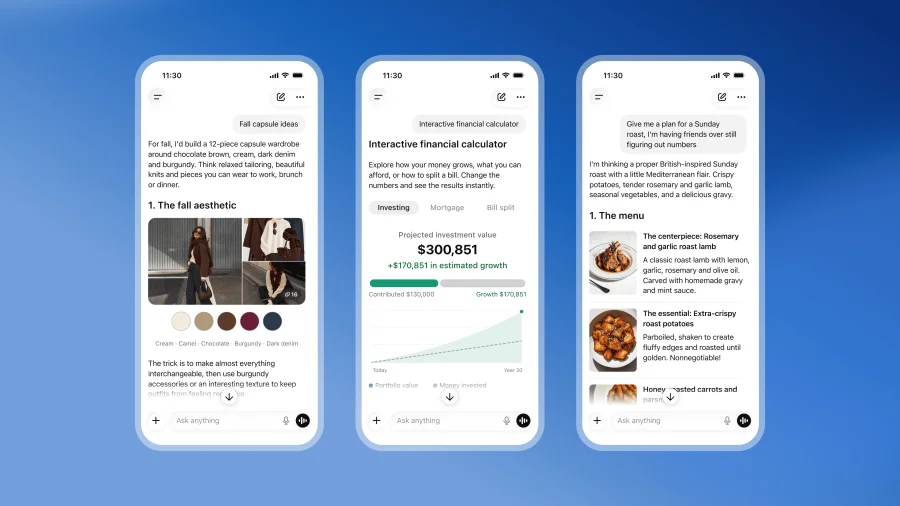
The core of this update is a change in how ChatGPT responds. Instead of just generating paragraphs of text, the new interface is designed to generate interactive elements as part of its output. This means the chatbot can now create visual components—like charts, buttons, or dynamic displays—directly within the conversation.
According to the original announcement, the goal is to make the chatbot more visual. For users, this could mean asking for a breakdown of data and receiving a generated chart instead of a list of numbers.
Why OpenAI Is Pushing for a Visual ChatGPT
For years, the primary way to interact with AI has been through text. While effective, it has limits. Complex information, such as financial data, project timelines, or comparative analysis, can be difficult to parse in a wall of text.
By introducing an "Intelligent UI," OpenAI appears to be addressing this friction. The move is a direct attempt to make the AI's output more digestible and immediately useful. It signals a shift from an AI that simply "tells" you the answer to one that "shows" you the answer in a format you can interact with.
The Challenge of Show Over Tell
However, the headline "More Show Than Tell" hints at a potential trade-off. A more visual interface can be a double-edged sword. While it can clarify complex ideas, it can also add unnecessary layers to simple tasks.
The risk is that the "show" becomes a distraction from the "tell." If a user asks a straightforward question, a purely text answer is often the fastest and most efficient response. The success of this update will depend on whether the visual elements are genuinely helpful or if they become a gimmick that slows down the user experience.
What This Means for Everyday Users
For the average user, this update will change the look and feel of their daily interactions with ChatGPT. The chatbot is no longer just a conversationalist; it is becoming a dynamic interface.
This could be particularly impactful for professionals who use the tool for data analysis, students who need visual explanations of complex topics, or anyone trying to understand a new concept. The promise is that the AI will not just give you information, but present it in a way that is easier to understand at a glance.
Confirmed Facts vs. What Remains Unclear
Confirmed: OpenAI is updating ChatGPT for all users with an "Intelligent UI" that generates interactive elements as part of its outputs. The update is focused on making the chatbot more visual.
Unclear: The specific types of interactive elements, the exact timeline for the full rollout, and how this will affect the speed or performance of the chatbot remain unspecified. It is also unclear how users will be able to toggle between the new visual interface and the traditional text-only mode.
The Wider Trend: AI's Visual Turn
This move is part of a broader trend in the tech industry. AI companies are increasingly moving beyond text-only models. From AI that can generate images and videos to interfaces that can understand and create visual data, the next frontier is multimodal.
OpenAI's update is a significant step in this direction. It acknowledges that human understanding is deeply tied to visual processing. By making its flagship product more visual, OpenAI is positioning ChatGPT not just as a text generator, but as a comprehensive tool for work and creativity.
Risks and Balanced View
While the update is a bold step, it is not without risks. A more complex interface could lead to a steeper learning curve for new users. There is also the question of performance—generating visual elements requires more computational power, which could impact response times.
Furthermore, the "Intelligent UI" could lead to a more cluttered experience. If every response includes a visual element, the interface could become overwhelming. The key will be in the execution: ensuring the visuals are additive, not distracting.
Practical Guidance for Users
As this update rolls out, users should be prepared for a change in their workflow. It is worth exploring the new visual features to see how they can enhance your use of the tool. For tasks that require quick, text-based answers, you may still prefer the traditional mode.
For more complex queries, the new interactive elements could save time and improve comprehension. The best approach is to experiment and see what works for your specific needs.
Future Outlook
The rollout of the "Intelligent UI" is likely just the beginning. If successful, we can expect OpenAI to expand the capabilities of these visual elements, perhaps allowing for more complex interactions and customization.
The ultimate goal is likely to make ChatGPT a more intuitive and powerful assistant. The coming months will reveal whether this visual shift is a genuine leap forward or simply a new coat of paint on the same engine.
Our Take
OpenAI's "Intelligent UI" is a clear signal that the company is not content with ChatGPT being just a text-based chatbot. It is a strategic move to make the AI more accessible and useful for a wider range of tasks. The headline "More Show Than Tell" captures the essence of this update: it is a bet on the power of visual communication.
However, the success of this bet hinges on one thing: utility. If the visual elements make the AI easier and faster to use, it will be a win. If they are merely decorative, they will be a distraction. For now, OpenAI is showing us the future of AI interaction. The question is whether users will want to watch.
Frequently Asked Questions
What is the new ChatGPT "Intelligent UI"?
It is a new interface for ChatGPT that generates visual, interactive elements as part of the chatbot's responses, moving beyond plain text.
Is this update available to all users?
Yes, OpenAI is updating ChatGPT for all users with this new visual interface.
How will this change how I use ChatGPT?
You may see charts, buttons, or other interactive elements in responses. This is intended to make complex information easier to understand, but you can still ask for text-based answers.
Does this mean ChatGPT is no longer text-based?
No, text remains a core part of the experience. The update adds a visual layer to the existing text-based interaction.