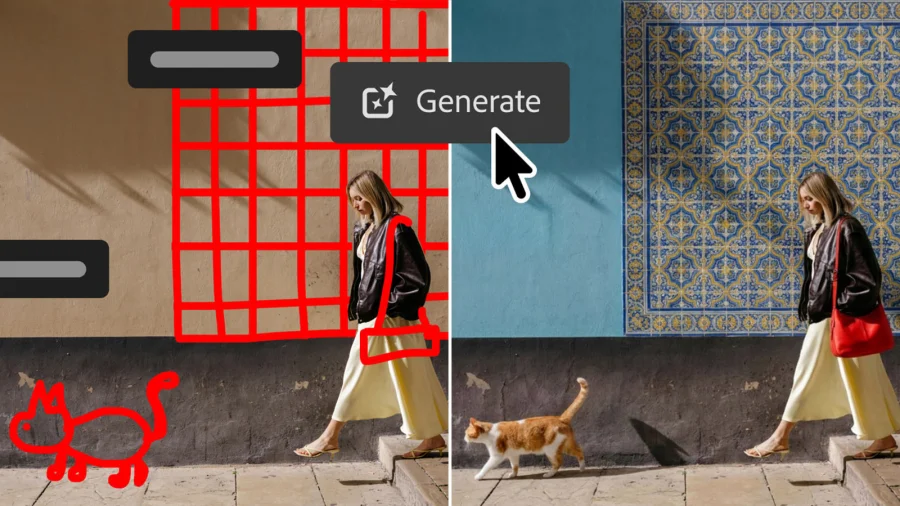
Imagine telling a designer exactly what to change without writing a single word. That's the promise of Photoshop's new Markup feature — a tool that lets you draw directly on an image to show precisely what you want altered. For anyone who has struggled to explain a visual tweak through text, this feels like a quiet revolution.
What the Markup Feature Actually Does
The Markup tool allows users to sketch, circle, or annotate directly on a canvas within Photoshop. Instead of describing an edit in an email or a chat message, you can now visually point to the exact area that needs attention. This is especially useful for photographers, graphic designers, and creative teams who rely on precise visual feedback.
According to the original announcement, the feature is part of a broader update that also introduces new image-generation capabilities and Lightroom-like controls — tools that users have requested for years.
Why Drawing on Images Changes the Workflow
Creative collaboration often breaks down when words fail. A client might say "make it pop," but what does that mean? With Markup, they can circle a section, draw an arrow, or sketch a rough idea directly on the image. This reduces misinterpretation and speeds up revisions.
For freelancers and agencies, this could mean fewer revision cycles and clearer client communication. It also lowers the barrier for non-designers to participate in the creative process without needing to learn complex editing tools.
The Long Wait for Lightroom-Like Controls
Beyond Markup, the update signals Adobe's commitment to bringing Lightroom's intuitive controls into Photoshop. Users have long wanted simpler sliders and more accessible adjustments without diving into layers and masks. This move suggests Adobe is listening to its community's most persistent requests.
The combination of Markup, image-generation features, and Lightroom-style controls points to a more unified, user-friendly Photoshop — one that serves both professionals and casual creators.
Who Benefits Most From This Update
Photographers editing client shots will find Markup invaluable for showing retouching notes. Web designers can annotate UI mockups directly. Marketing teams can mark up campaign visuals before approval. Even educators teaching design can use the tool to provide visual feedback on student work.
The feature also supports remote collaboration, which has become essential in distributed teams. Instead of lengthy email threads, a single annotated image can convey everything needed.
Adobe's Position and What Users Are Saying
Adobe has not yet released a detailed official statement about the Markup feature beyond the initial announcement. However, early reactions from design communities suggest excitement, particularly around the potential to streamline workflows.
Some users have expressed curiosity about how Markup will integrate with existing annotation tools and whether it will support tablet and stylus input fully. Others are eager to see how it pairs with the new image-generation features.
What This Means for Photoshop's Future
The introduction of Markup is more than a single tool — it's a signal. Adobe appears to be shifting Photoshop from a purely technical editing platform to a more collaborative, accessible creative space. By adding features that bridge communication gaps, the company is positioning Photoshop to remain essential in an increasingly AI-driven creative landscape.
This update also reflects a broader industry trend: software is becoming more intuitive, with visual communication taking priority over technical complexity.
Confirmed Facts vs What Remains Unclear
What's confirmed: Photoshop is adding a Markup feature that lets users draw on images to indicate edits. The update also includes new image-generation tools and Lightroom-like controls.
What's unclear: The exact release timeline, whether Markup will be available on all platforms (desktop, iPad, web), and how it will handle collaboration features like shared annotations. Adobe has not yet detailed these specifics.
Adobe's Competitive Edge in Creative Software
Adobe's strength lies in its ecosystem. Photoshop doesn't exist in isolation — it connects with Lightroom, Illustrator, and Creative Cloud libraries. The Markup feature enhances this ecosystem by making it easier for teams to collaborate within Adobe's tools rather than switching to third-party annotation apps.
This integration is a key differentiator. While standalone tools like Figma or Canva offer annotation features, Adobe's deep integration with professional-grade editing tools gives it a unique advantage.
Potential Concerns and Limitations
No tool is without drawbacks. Some users may find Markup redundant if they already use external annotation tools. Others might worry about clutter — too many annotations on a canvas could become confusing.
There's also the question of learning curve. While Markup is designed to be intuitive, Photoshop's interface can still be overwhelming for new users. Adobe will need to ensure the feature is discoverable and easy to use.
The Bigger Picture: Visual Communication Is Rising
This update fits a larger pattern across the tech industry. From collaborative whiteboards to AI-powered design tools, the focus is shifting toward visual, intuitive communication. Photoshop's Markup feature is a natural extension of this trend, acknowledging that sometimes a drawing is worth a thousand words.
What You Should Do Now
If you're a Photoshop user, update to the latest version to check for the Markup feature. Experiment with it on a simple project to understand how it fits your workflow. For teams, consider how Markup could streamline your feedback process — it might just save you hours of back-and-forth.
What Happens Next
Adobe is likely to refine Markup based on user feedback. Future updates may bring shared annotation links, better stylus support, or integration with Adobe's collaboration tools. The broader update also hints at more AI-powered features on the horizon.
Our Take
Photoshop's Markup feature is a small addition with significant implications. It acknowledges that creativity is collaborative, and that clear communication is as important as technical skill. By making it easier to show rather than tell, Adobe is helping creators work smarter — and that's a win for everyone.
Frequently Asked Questions
What is the Photoshop Markup feature?
The Markup feature in Photoshop lets users draw or annotate directly on an image to indicate specific edits or changes. It's designed to improve visual communication between designers, clients, and team members.
How do I use Markup in Photoshop?
To use Markup, update Photoshop to the latest version. Look for the Markup tool in the toolbar or annotation menu. Select it, then draw directly on the image to add notes, circles, arrows, or sketches.
Is the Markup feature available on all Photoshop platforms?
Adobe has not yet confirmed full platform availability. The feature is rolling out in the latest desktop version, with potential expansion to iPad and web versions expected in future updates.
Will Markup replace other annotation tools?
Markup is designed to complement existing tools, not replace them. It offers a more integrated way to annotate within Photoshop, reducing the need for external apps.