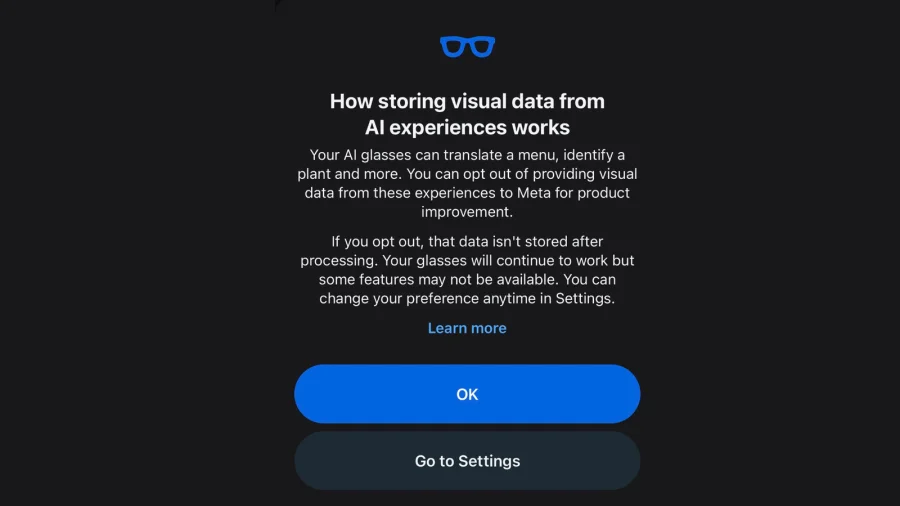
You put on your smart glasses, tap the frame, and capture a moment. What happens to that photo or video next is decided by a setting most people never open — and it determines whether Meta can use your visual data to train its AI.
The control lives inside the Meta View app, not on the glasses. That single detail is why so many owners miss it.
The Setting That Decides Where Your Photos Go
Meta's Ray-Ban smart glasses let you take photos and short videos hands-free. That media syncs to your phone through the Meta View app, which is also where privacy and data controls are managed.
Among those controls is a setting that governs whether your captured content can be used to improve Meta's AI. If it's on, your visual data may be reviewed and used for that purpose. If it's off, that use is restricted.
Why a Toggle Buried in an App Matters So Much
Smart glasses see what you see. That makes their data fundamentally different from a typed search or a tapped like — it's a visual record of your surroundings, your home, your workplace, and the people around you.
For anyone who wears them daily, the setting isn't a minor preference. It's the line between a personal camera and a data pipeline.
How the Choice Ended Up in the App, Not the Frame
Meta has positioned its glasses as a consumer device first, with privacy controls handled through the companion app rather than on-device menus. That design keeps the hardware simple, but it also means the decision point is easy to overlook.
Users typically set up the glasses once, connect them, and then rarely return to the app's deeper settings screens.
Who Is Actually Affected by This Setting
Anyone using Meta's Ray-Ban smart glasses and capturing photos or video is affected. That includes casual users, content creators, and people who wear them for work.
Bystanders matter too. Even if you never review your own footage, the people captured in it are part of the same data question.
What Meta Says About the Control
Meta provides the setting as part of its data and privacy controls within the Meta View app, giving users a way to manage how their information is handled.
The company has not framed the setting as hidden — it's documented — but its location inside the app rather than on the device is what makes it easy to miss.
Reading the Fine Print Behind a Simple Toggle
A single switch carries a lot of weight. It can determine whether your footage is used to sharpen AI systems that may eventually power features on the very glasses you're wearing.
That's the trade-off at the center of the story: better AI in exchange for access to your visual world.
What's Confirmed and What Still Isn't Clear
Confirmed: the setting exists in the Meta View app and relates to how captured data may be used for AI improvement.
Less clear: exactly how much human review is involved, how long data is retained, and how the choice interacts with other Meta services. Those details depend on Meta's current policies and should be checked directly.
Why Meta's Ecosystem Makes This Decision Stickier
Meta's advantage is its ecosystem. The glasses connect to your phone, your accounts, and Meta's broader AI efforts — which means a single setting can ripple across services.
That integration is what makes the glasses useful. It's also what makes the privacy choice consequential.
The Fair Questions Users Are Right to Ask
Critics of smart glasses have long raised concerns about consent — both from wearers and from the people around them. A setting that governs AI training doesn't resolve those broader questions.
It also doesn't stop the glasses from recording. It only limits one specific use of the data.
The Bigger Shift Toward Always-On Cameras
Meta's glasses are part of a wider move toward wearable cameras that see continuously rather than on command. As that trend grows, the settings that govern visual data will matter more, not less.
What feels like a niche toggle today may become a standard privacy decision for millions of users.
What You Should Do Right Now
Open the Meta View app, go to settings, and find the privacy and data controls. Review the option related to AI improvement and decide whether the current choice matches your comfort level.
If you're unsure, turn it off. You can always change it later — but you can't unshare data already used.
What Could Change Next
Meta is likely to keep expanding AI features on its glasses, which could mean more data-related settings appear over time. Regulators in several regions are also paying closer attention to wearable cameras.
For now, the control is in your hands — if you know where to look.
Our Take
This isn't a scandal. It's a design choice. Meta put a meaningful privacy control inside an app that most users open once and forget. That's not deception, but it isn't transparency either.
The real issue is that smart glasses blur the line between personal device and data collection tool. Until that line is clearer, the burden falls on users to check settings they were never prompted to revisit.
Frequently Asked Questions
Can I stop Meta from using my smart glasses' photos for AI training?
Yes. The control is in the Meta View app under privacy and data settings. Turning it off restricts that use, though it doesn't stop the glasses from capturing or syncing media.
Where exactly is the setting located?
It's inside the Meta View app, not on the glasses themselves. Open the app, go to settings, and look for the privacy or data controls section.
Does turning it off stop the glasses from recording?
No. The setting only affects whether your visual data can be used for AI improvement. Recording and syncing continue as normal.
Will this setting change in the future?
Possibly. As Meta adds AI features and regulators scrutinize wearable cameras, the options and defaults may shift. It's worth checking periodically.