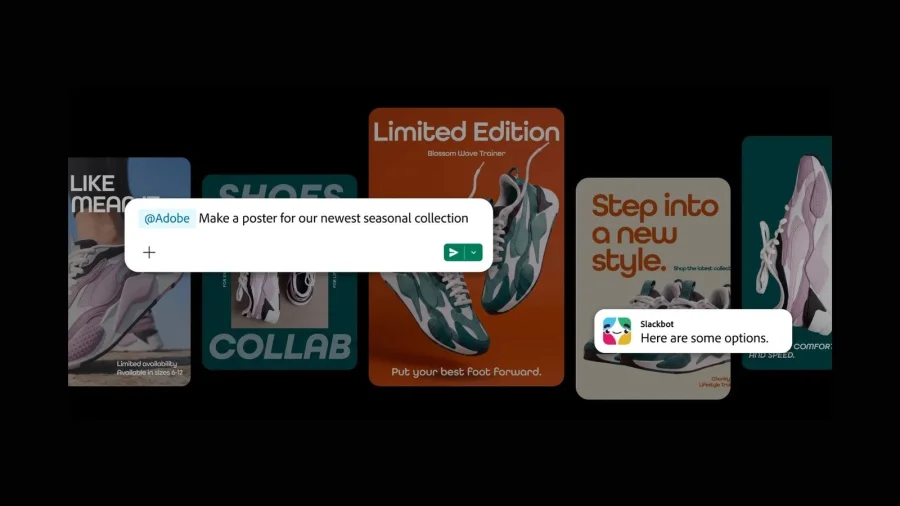
The days of jumping between your team chat and a heavy creative suite may be ending. Adobe has quietly changed how creative work happens inside Slack by bringing more than 70 tools from its flagship applications — Photoshop, Illustrator, Premiere Pro, and others — directly into the platform. The result? You can now ask Slackbot to handle the Photoshopping for you.
What Adobe’s Slack Integration Actually Does
This is not a simple file-sharing update. Adobe has embedded actual creative functionality into Slack's conversational interface. Instead of opening a separate application, users can type a request into Slackbot and receive a completed creative task — whether that's retouching an image, adjusting a vector graphic, or making a quick video edit.
The move effectively turns Slack into a front-end for Adobe's powerful creative engine. For teams that rely on rapid iteration — marketing departments, content studios, design agencies — this could remove a significant bottleneck from their daily workflow.
Why This Integration Matters for Everyday Teams
Consider the typical scenario: a marketing manager needs a quick image crop for a social post, but the designer is busy with a larger project. Currently, that request creates a bottleneck. With this integration, the manager can simply ask Slackbot to perform the task, and the creative tool handles it in the background.
This is about democratizing access to creative tools. Not everyone on a team is a trained Photoshop expert, but many people need basic creative tasks completed. By placing these tools inside Slack, Adobe is making professional-grade capabilities available to non-designers in a low-friction way.
How the Creative Workflow Shift Happened
Adobe has been steadily pushing its tools toward cloud-based and AI-assisted workflows. The company has invested heavily in its Sensei AI platform and has been integrating generative AI features across its product line. This Slack integration appears to be the next logical step in that strategy — bringing the power of its creative suite to where modern teams already communicate.
Slack, for its part, has been expanding its own AI capabilities. The platform has introduced Slack AI features and has been positioning itself as a central hub for enterprise work. This partnership aligns with that vision, making Slack not just a communication tool but a place where work actually gets done.
Who Benefits Most from Adobe Tools in Slack
The clearest beneficiaries are cross-functional teams where creative requests flow through a central communication channel. A product team that needs quick mockups, a social media team that needs fast image variations, or an advertising team that needs to iterate on campaign assets — all of these groups can now move faster.
For freelance creatives and agencies, the integration could also change client relationships. Instead of sending files back and forth, teams can collaborate on creative tasks in real time within the same thread where the conversation is happening. This reduces context-switching and keeps the entire creative process visible and traceable.
Adobe’s Position in the AI Creative Race
This move places Adobe firmly in the conversation about AI-assisted creativity. Competitors like Canva have already made design accessible to non-designers, and tools like Midjourney have shown the power of conversational creative prompts. Adobe's advantage has always been its professional-grade toolset — and now it is pairing that depth with conversational accessibility.
The company's moat lies in its ecosystem. Photoshop, Illustrator, and Premiere Pro are industry standards with decades of user investment. By making these tools available through Slack, Adobe is not just adding a feature — it is reinforcing its position as the backbone of professional creative work while adapting to how modern teams operate.
What This Means for Creative Professionals
There is an understandable concern among professional designers: does this integration make their skills less valuable? The evidence suggests otherwise. This integration handles routine, repetitive tasks — the kind that consume a designer's time without showcasing their talent. By automating basic edits, Adobe is freeing professionals to focus on higher-level creative direction.
For design leaders, this could mean reallocating team resources. If routine tasks are handled through Slack, senior designers can spend more time on complex, strategic creative work that genuinely requires their expertise.
Confirmed Details vs What Remains Unclear
Confirmed: Adobe has integrated 70+ tools from its creative applications into Slack. Users can interact with these tools through Slackbot. The integration covers major apps including Photoshop, Illustrator, and Premiere Pro.
Unclear: The full list of available tools has not been publicly detailed. Pricing structure — whether this requires a premium Adobe or Slack subscription — has not been announced. The rollout timeline for all users remains unspecified. Adobe has not yet provided detailed technical documentation or case studies.
Adobe’s Strategic Advantage in This Partnership
Adobe's competitive strength has always been its comprehensive creative ecosystem. No other company offers the same depth across image editing, vector graphics, video production, and PDF management. By integrating this ecosystem into Slack, Adobe is leveraging its distribution advantage — meeting users where they already work rather than requiring them to come to its tools.
This is a network-effect play. As more teams use Adobe tools inside Slack, the integration becomes more valuable, and switching to a competitor becomes more disruptive. For Adobe, this is about deepening customer lock-in while genuinely improving the user experience.
Balanced View: Benefits and Potential Drawbacks
Benefits: Reduced context-switching, faster turnaround for routine tasks, democratized access to creative tools, and streamlined team workflows.
Concerns: Questions remain about data privacy — creative assets processed through Slack will pass through Adobe's cloud infrastructure. There are also concerns about over-reliance on AI for creative decisions and the potential for reduced design quality if non-professionals handle tasks beyond their skill level. Some users may find the integration limited compared to the full-featured desktop applications.
The Broader Pattern: AI Is Reshaping Creative Software
This integration is part of a larger industry shift. Across the software landscape, AI is moving from being a feature within applications to becoming the interface itself. We are seeing this with Microsoft's Copilot across its Office suite, Google's Gemini integrations, and now Adobe's presence in Slack.
The pattern is clear: the future of software is conversational. Users will increasingly interact with powerful tools through natural language rather than complex menus and toolbars. Adobe's Slack integration is an early and significant example of this trend in the creative software space.
What Teams Should Do Now
For teams already using both Adobe Creative Cloud and Slack, the first step is to check whether the integration is available in your workspace. If it is, start with simple, low-risk tasks to understand the capabilities and limitations. Identify routine creative requests that currently consume team time and test whether the Slackbot integration can handle them effectively.
For teams not yet using Adobe products, this integration is worth monitoring as a signal of where creative software is heading. The ability to perform professional-grade creative tasks from within a communication platform could eventually change how creative teams are structured and how work is assigned.
What Happens Next with Adobe and Slack
The immediate future will likely bring more details about the full tool list and pricing structure. Adobe may also expand the integration to include more of its applications — Dreamweaver, After Effects, and others could follow. We can also expect Slack to position this as a flagship example of its AI-powered future.
Longer term, this integration could pave the way for more sophisticated AI-assisted creative workflows. Imagine asking Slackbot to generate multiple design variations based on a brief, or to automatically format images for different social platforms. The foundation being laid now could support these capabilities in the near future.
Our Take
Adobe's move into Slack is more significant than it might first appear. This is not just a convenience feature — it is a strategic repositioning of how creative work gets done. By meeting users in their communication platform of choice, Adobe is acknowledging that the traditional model of opening a dedicated application for every task is increasingly outdated.
The integration also signals Adobe's confidence in its AI capabilities. The company is essentially saying that its AI can handle routine creative tasks well enough to be trusted in a fast-paced team environment. For a company whose tools are used by the world's most demanding creative professionals, that is a bold statement.
The real test will come as teams begin using this integration in production environments. If it delivers on its promise, it could fundamentally change the relationship between creative tools and team collaboration. If it falls short, it will be a reminder that even the most powerful AI still needs careful human oversight.
Frequently Asked Questions
What is the Adobe Slack integration?
The Adobe Slack integration brings over 70 tools from Adobe's creative applications — including Photoshop, Illustrator, and Premiere Pro — directly into Slack. Users can ask Slackbot to perform creative tasks like image editing without leaving their Slack workspace.
How do I use Adobe tools inside Slack?
Users can interact with the integrated Adobe tools by sending requests to Slackbot within their Slack workspace. For example, you could ask Slackbot to edit or retouch an image, and the task would be completed using Adobe's creative engine.
Which Adobe applications are included in the Slack integration?
The integration includes tools from major Adobe applications, specifically Photoshop, Illustrator, and Premiere Pro, among others. The full list of 70+ tools has not yet been publicly detailed by Adobe.
Is the Adobe Slack integration available to all users?
Adobe has announced the integration, but the full rollout timeline and availability details have not been specified. Users should check their Slack workspace for availability and watch for official announcements from Adobe regarding broader access.